New way to inspect
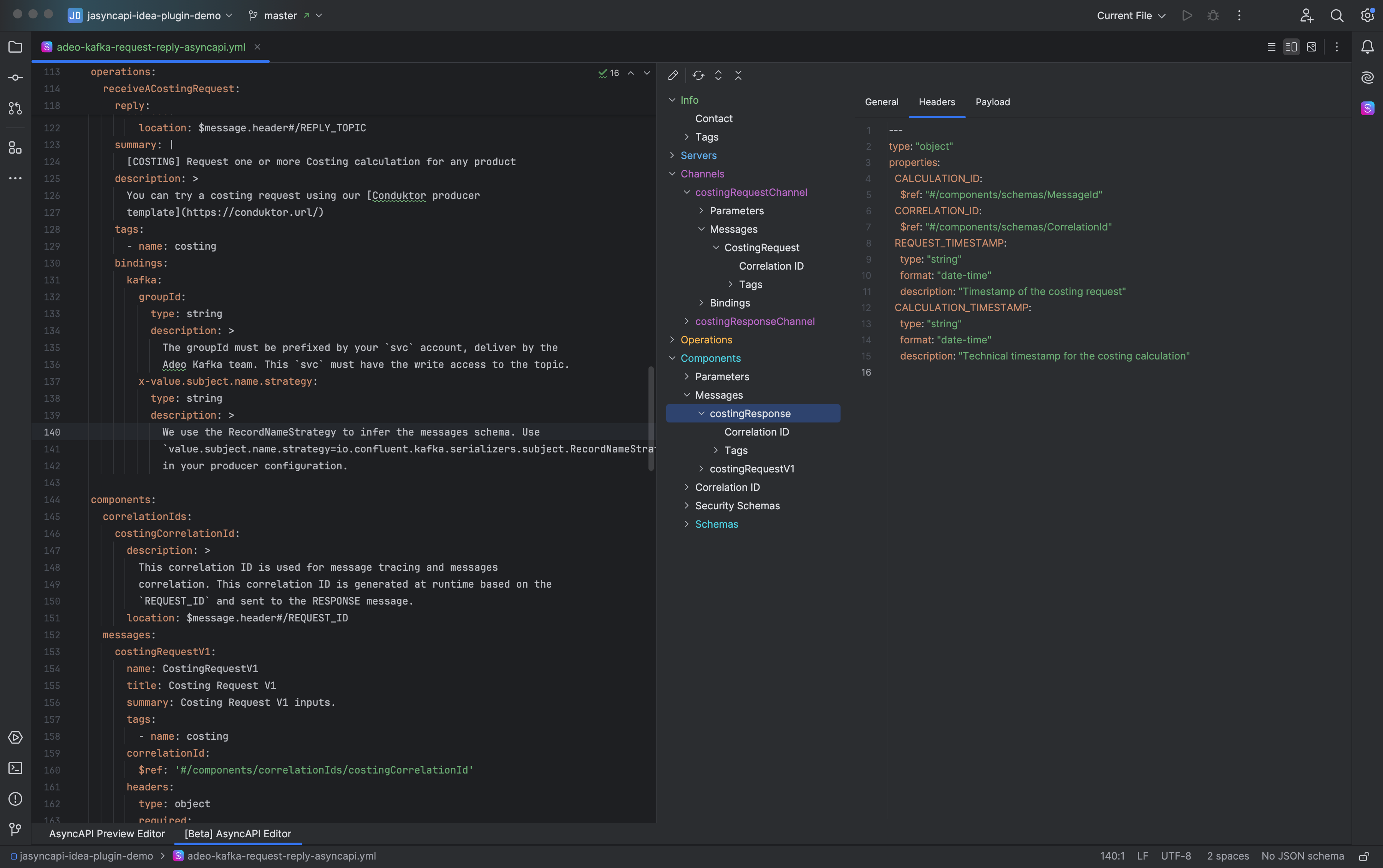
Working with a large AsyncAPI file in plain text can be painful.
You scroll… and scroll… and scroll…
You search for a channel definition, try to remember where servers live, or lose track of a deeply nested component. The new native UI eliminates all of that.
Now you can understand your entire specification at a glance - without opening a single line of YAML or JSON.
🌳 A Familiar Tree Navigation
Just like exploring a project structure, all AsyncAPI elements are now organized into a clean, intuitive tree:
- Servers
- Channels
- Operations
- Messages
- Components
- Security
- Bindings
Everything is visible, structured, and easy to open with a click.
🔗 Better reference resolving
A single engine resolves every $ref — local pointers, file references, and remote http / https references — the same way in the editor and in the preview
- Reference completion, local and remote — Free. Completion is offered for every kind of
$refas you type it - Current-folder listing — Free. While you write a file reference, completion lists the contents of the current folder, so you can find and pick the right
.jsonor.yamldocument without remembering its path. Rename a referenced file and every$refto it updates automatically - JSON Pointer navigation into local or remote content — Free. After the
#, completion offers the elements inside the target document — a local file or a remote URL — so you can point straight at the exact node you need, for example oneserveror onemessage. Go to Declaration (Ctrl/Cmd+B) follows the pointer into that document's own content and puts the caret on the element - One approved remote host — Free. A remote reference is never fetched until you allow its host. You may keep one allowed host on the free tier; denying hosts is unlimited and always free. Allowing more than one host is a Pro feature. Answers are stored per project and can be reviewed, changed, or removed in _Settings → Tools → AsyncAPI → Remote References
- HTTP proxy — Pro. Route remote reference resolution through a configurable proxy.
Also handled: reference chains (a $ref that points at another $ref), references met part-way along a pointer path, Avro .avsc schemas, cross-language JSON↔YAML references, cycle detection, and a dedicated inspection that names each problem — unreachable document, pointer that finds nothing, unsupported fragment, reference cycle, host awaiting a decision — with its own quick fix
👁 Clear, instant overview
The UI renders each element with proper fields, objects, and descriptions.
No more guessing what a property contains or how things connect - you see it, fully formatted.
⚡ A massive time-saver
Instead of scrolling through a 3,000-line file:
- Open the UI
- Browse the tree
- Inspect elements instantly
It’s the fastest way to understand a spec you didn’t write, revisit an old one, or review someone else’s work.
🧠 Designed for clarity
AsyncAPI specs can get complex. The native UI makes them simple.
No more searching
No more scrolling
Just open and see exactly what your AsyncAPI specification contains