AsyncAPI Plugin for IntelliJ-based IDEs 🚀
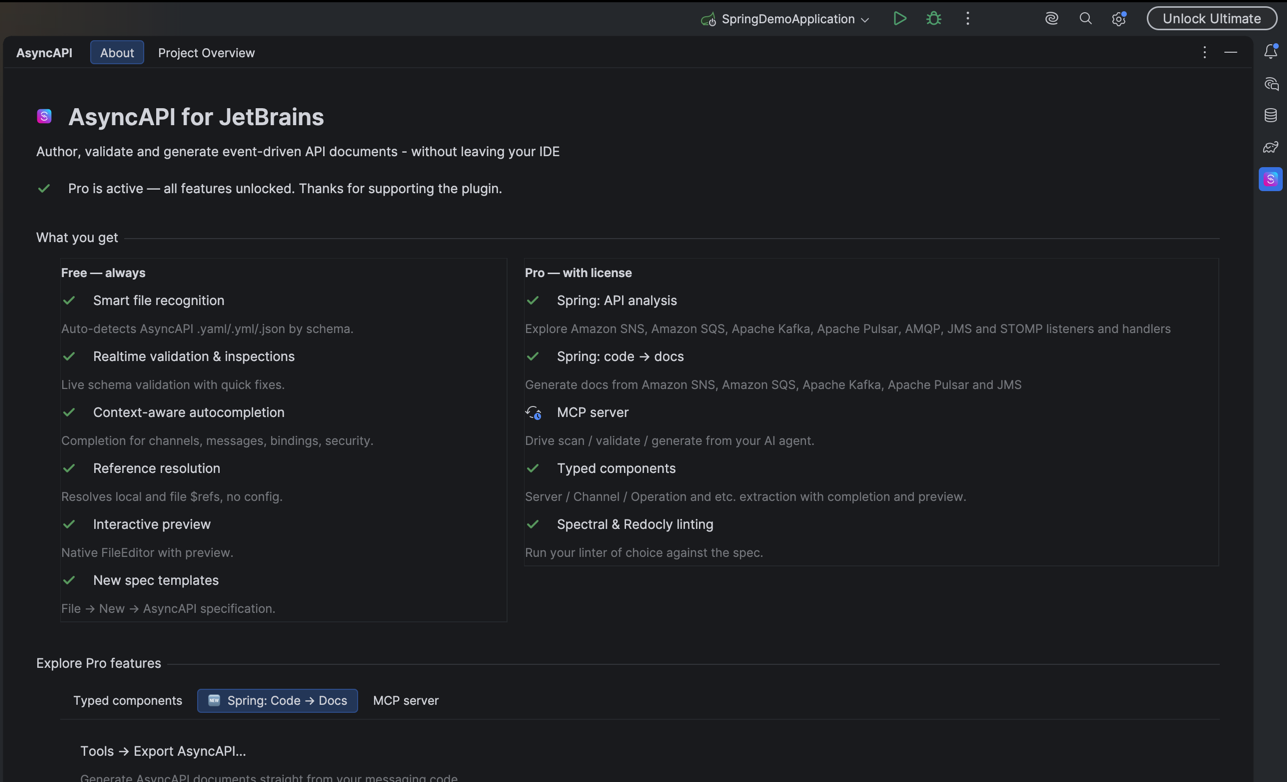
Enhance your AsyncAPI development workflow directly within IntelliJ IDEA, Android Studio, and other JetBrains IDEs
👩💻 For AsyncAPI contract authors
Create a new AsyncAPI contract — Free
Start a contract from scratch or from a template via File → New → AsyncAPI, in YAML or JSON, for AsyncAPI 2.6.0 or 3.0.0. Referenced files are recognised automatically and get the AsyncAPI file icon.
Explore a contract in the editor — Free
Open any AsyncAPI document and browse it as a structured tree: servers, channels, operations, messages, schemas, and bindings, with colored nodes, grouped detail views, and click-to-navigate between them. Read-only exploration is free; switching the editor into edit mode is a Pro feature (see below).
Validate a contract — Free
Real-time validation against dedicated, up-to-date AsyncAPI JSON Schemas for 2.x and 3.x, with inline error highlighting and quick fixes as you type.
Complete a contract — Free
Context-aware completion for channels, operations, messages, bindings, components, security schemes, and enum values, driven by the same schemas used for validation.
Preview a full contract — Free
Render a whole AsyncAPI document instantly — in a split pane inside the IDE or in your browser — for AsyncAPI 2.6.0, 3.0.0, and 3.1.0, with local, file, and remote references dereferenced (subject to the remote-host limit below).
Resolve references — Free, with Pro extras
A single engine resolves every $ref — local pointers, file references, and remote http / https references — the same way in the editor and in the preview.
- Reference completion, local and remote — Free. Completion is offered for every kind of
$refas you type it. - Current-folder listing — Free. While you write a file reference, completion lists the contents of the current folder, so you can find and pick the right
.jsonor.yamldocument without remembering its path. Rename a referenced file and every$refto it updates automatically. - JSON Pointer navigation into local or remote content — Free. After the
#, completion offers the elements inside the target document — a local file or a remote URL — so you can point straight at the exact node you need, for example oneserveror onemessage. Go to Declaration (Ctrl/Cmd+B) follows the pointer into that document's own content and puts the caret on the element. - One approved remote host — Free. A remote reference is never fetched until you allow its host. You may keep one allowed host on the free tier; denying hosts is unlimited and always free. Allowing more than one host is a Pro feature. Answers are stored per project and can be reviewed, changed, or removed in Settings → Tools → AsyncAPI → Remote References.
- HTTP proxy — Pro. Route remote reference resolution through a configurable proxy.
Also handled: reference chains (a $ref that points at another $ref), references met part-way along a pointer path, Avro .avsc schemas, cross-language JSON↔YAML references, cycle detection, and a dedicated inspection that names each problem — unreachable document, pointer that finds nothing, unsupported fragment, reference cycle, host awaiting a decision — with its own quick fix.
Work with AsyncAPI components — Pro
Treat standalone components as first-class files: create them from scratch or a template, validate them, get autocompletion in them, and preview them in isolation — for Server, Server Variable, Channel, Channel Parameter, Message, Message Trait, Message Correlation ID, Operation, Operation Trait, Operation Reply, and Operation Reply Address.
Edit contracts and components through the UI — Pro
Enable edit mode and change documents and extracted components through a UI form — in both JSON and YAML — with built-in validation that prevents invalid edits.
Lint with Spectral or Redocly — Pro
Lint your specifications with Spectral or Redocly, in automatic or manual mode, with .spectralignore / .redoclyignore support.
Find every contract and component in the project — Pro
The Project Overview tool window indexes every AsyncAPI document and standalone component in the project, filterable by AsyncAPI version and component type, so you can see what your project already describes and jump to any of it in one click — even in large, multi-module repositories.
🌱 For engineers working with Spring applications
Discover message handlers and listeners with Project Overview — Pro
The Project Overview tool window scans every module of your Spring project and maps its messaging endpoints, so you can see your event-driven architecture at a glance instead of searching for annotations by hand. Supported annotations:
- Apache Kafka —
@KafkaListener,@KafkaListeners,@KafkaHandler - RabbitMQ (AMQP) —
@RabbitListener - Apache Pulsar —
@PulsarListener - Amazon SQS —
@SqsListener,@SqsHandler - Amazon SNS —
@NotificationMessageMapping,@NotificationSubscriptionMapping,@NotificationUnsubscribeConfirmationMapping - JMS —
@JmsListener - STOMP —
@MessageMapping,@SubscribeMapping
Endpoints are attributed to the right module and broker for both Gradle and Maven source sets, searchable by class, method, or Javadoc, and every row links straight to its method or class in the editor. It stays fast on projects with hundreds of listeners.
See what you publish, and how it connects — Pro
Project Overview also finds where your code publishes messages, links senders to the listeners that consume the same channel, and lays the whole picture out as a topology:
- Send detection — every call through
KafkaTemplate,RabbitTemplate/AmqpTemplate,JmsTemplate/JmsMessagingTemplate,PulsarTemplate,SqsTemplate,SnsTemplate, andSimpMessagingTemplate(STOMP) is found, in both Java and Kotlin, with the destination reported exactly as written in the code. - Direction in the APIs tree — every module and broker splits into Receive and Send, with a dedicated Operation filter to narrow the tree to one direction.
- Declared replies — a listener that answers on another channel (
@SendTo, or a reply-to header on RabbitMQ and JMS) is shown right next to the listener that produces it. - Channel matching — a listener and a sender that name the same channel differently — a literal on one side, a
${property}placeholder or an@Value-injected field on the other — are recognised as the same channel. - Topology tab — the whole project laid out by channel instead of by code: producers, consumers, and the flows between them, readable hop by hop across module boundaries, plus a Traffic view for channels your project only consumes or only publishes.
- Hidden publishes — a listener that publishes further down its own call chain (through a service, a port, an interface) is found automatically and marked as an inferred route, kept visibly distinct from a route the code declares directly.
Generate a real AsyncAPI document from your code — Pro
Project Overview finds your messaging code; export turns it into an AsyncAPI document — one per environment, for Apache Kafka, Apache Pulsar, Amazon SQS, Amazon SNS, and JMS. Bindings, topic and queue names, FIFO detection, and dedup settings are read from what the code actually does, not typed in by hand and left to drift. Run it from Tools → Export AsyncAPI….
Catch messaging bugs before they ship — Pro
Inspections flag configuration mistakes right where you write the listener, across all five protocols — two @KafkaListeners sharing a groupId on the same topic (silently splitting partitions instead of each getting every record), an empty @KafkaListeners container, a blank Amazon SQS or JMS destination, an ambiguous handler payload type, and more.
See the whole flow, not just one protocol — Pro
A handler that receives on one protocol and republishes on another — a Kafka listener that raises an Amazon SNS notification, an Amazon SQS listener that forwards to Kafka — is described end to end: both operations, in both generated documents, even when the publish happens several calls down the chain.
What's free / What's Pro
Free — no account required
- Create a new AsyncAPI contract from scratch or a template
- Explore a contract in the editor in read-only mode (tree, navigation, detail views)
- Validate a contract and see errors in the editor
- Complete a contract as you type
- Preview a full contract (in-IDE and browser)
- Reference completion — local and remote
- Current-folder listing while writing a local file reference
- JSON Pointer navigation into local or remote content
- One approved remote host; denying hosts is unlimited
Pro
- Create AsyncAPI components from scratch or a template
- Validate and autocomplete AsyncAPI components
- Preview AsyncAPI components in isolation
- Edit AsyncAPI contracts and components through the UI
- Project Overview — explore Spring messaging (listeners, senders, and the topology between them), and find contracts and components across the project
- Generate AsyncAPI documents from Spring messaging code, catch configuration issues with inspections, and trace flows that cross protocols — for Apache Kafka, Apache Pulsar, Amazon SQS, Amazon SNS, and JMS
- More than one approved remote host while resolving references
- HTTP proxy for reference resolution
- Linting with Spectral or Redocly
Start a free trial to unlock the Pro features in seconds — no commitment. A license keeps solo development sustainable and funds what's next.
Supported protocols, bindings & components
Protocols (19): Amazon SNS, Amazon SQS, AMQP 0-9-1, AMQP 1.0, Anypoint MQ, Apache Kafka, Apache Pulsar, Google Cloud Pub/Sub, HTTP, IBM MQ, JMS, Mercure, MQTT, MQTT v5.0, NATS, Redis, Solace, STOMP, WebSockets.
Bindings: server, channel, operation, and message bindings for every protocol above.
Components (AsyncAPI v3): Server, Server Variable, Channel, Channel Parameter, Message, Message Trait, Message Correlation ID, Operation, Operation Trait, Operation Reply, Operation Reply Address — plus Schemas, Security Schemes, Tags, and External Documentation inside a full contract.
Schema formats: AsyncAPI Schema, JSON Schema, OpenAPI 3 Schema, Avro, and XML.
Specification versions: AsyncAPI 2.0.0, 2.1.0, 2.2.0, 2.3.0, 2.4.0, 2.5.0, 2.6.0, 3.0.0, and 3.1.0.
Roadmap
An MCP server is next — connect AI agents to scan your project, validate specs, and generate AsyncAPI documents through open, standard tooling.
Feedback
Issues and ideas: GitHub.